
Trade settings
Manage tx settings and presets for SOL and EVM chains.
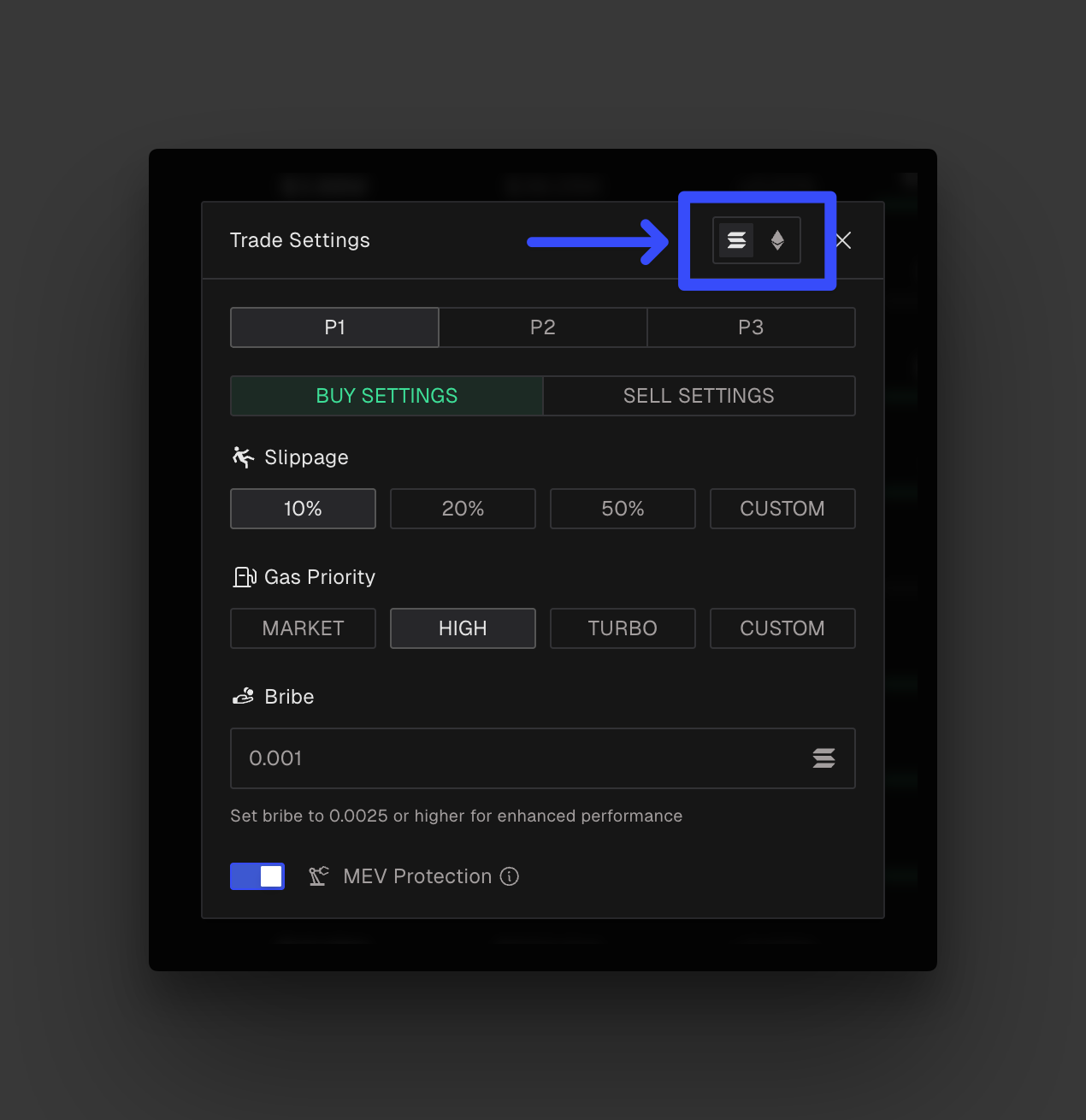
OPSIN gives you full control over how your trades are executed, even in the most volatile market conditions. You can create and switch between 3 customizable trade presets — P1, P2, and P3 — depending on the trade type and current market dynamics.
Each preset allows you to define distinct settings for both BUY and SELL orders, so you can fine-tune your strategy for every situation.
Make sure you’re using the correct network settings. Solana and EVM chains (Ethereum, BNB, Monad, Base, Arbitrum) are handled separately and follow different logic. Trading settings on Solana don’t carry over to EVM tokens and vice versa.
How to change settings

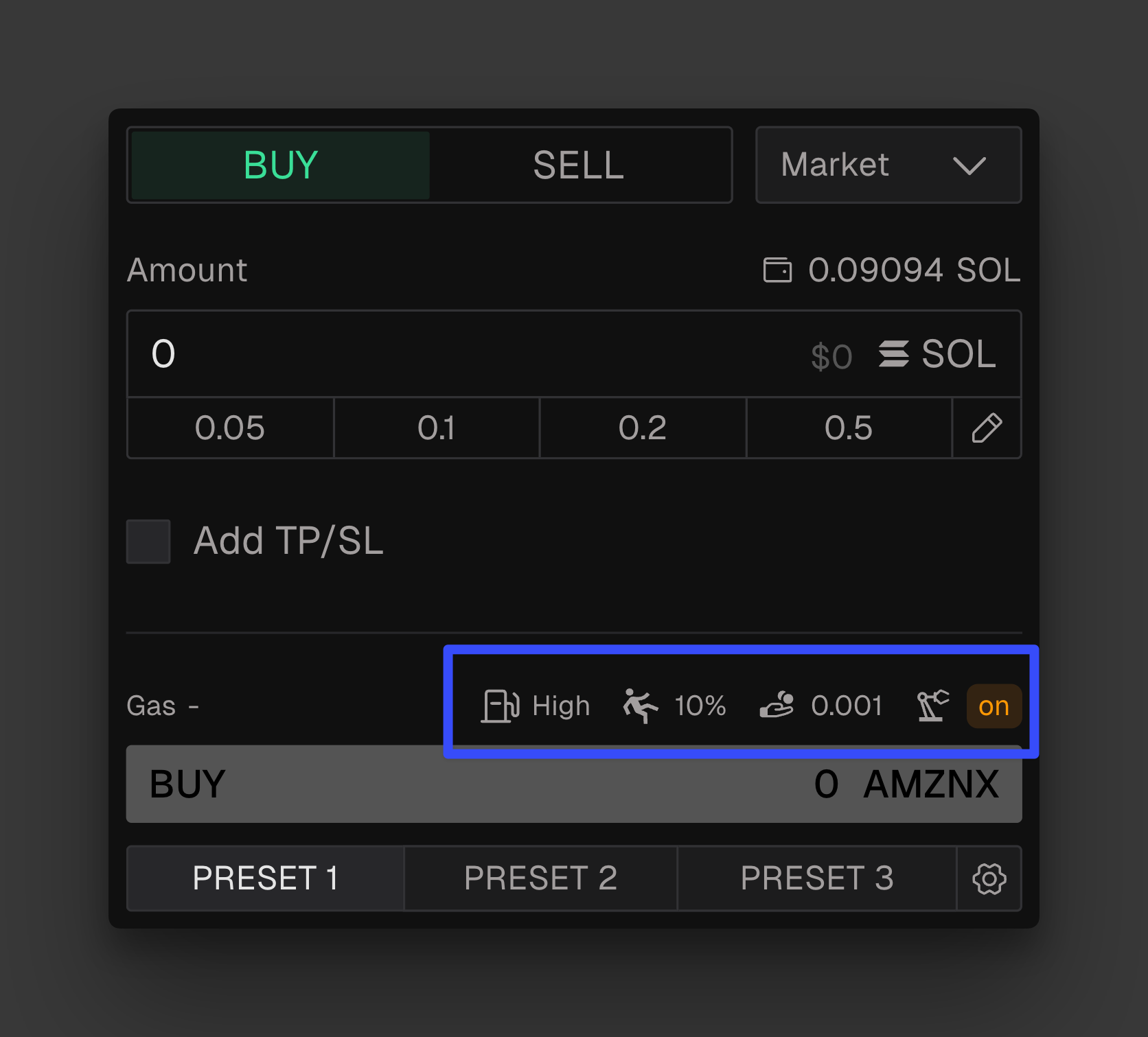
Not sure which settings you're currently using?
You can quickly view your active trading settings directly above the Buy button. This helps you double-check key parameters like slippage, priority fee, and bribe before executing a trade.
Overview
Priority fee (Solana)
To speed up your transactions during periods of high volatility you can set a priority fee.
This fee is added on top of the base gas cost and goes directly to validators or miners, incentivizing them to prioritize your trade in the next block.
During periods of high volatility or hyped token launches, increasing your priority fee helps ensure your transaction is processed faster and doesn’t fail.
You can choose between 4 options:
Market: current market gas ×1.5
High: current market gas ×5
Turbo: current market gas ×10
Custom: input your desired amount of SOL to be used as priority fee (max is 2 SOL).
If the value you enter is lower than market at the time of execution, OPSIN will auto-adjust it in the background to ensure the transaction goes through.
Gas priority (EVM)
This is conceptually the same as the priority fee but for all the supported EVM chains. You can choose between 3 options:
Medium: current market gas ×1.5
Fast: current market gas ×2
Ultra: current market gas ×3
Bribe (Solana only)
On Solana, a bribe is an optional payment sent directly to validators to incentivize faster inclusion of your transaction. It’s especially useful during periods of congestion, like hyped token launches or sudden market spikes.
OPSIN sets a default minimum bribe of 0.001 SOL, but you can raise it at any time to boost the priority and speed of your transaction. There’s no maximum limit.
We recommend increasing the bribe when:
You're trading during high-volume moments
You need faster fills to enter before everyone els
Slippage
Slippage is the maximum percentage of price movement you're willing to accept between the time you place your order and the moment it gets executed.
Setting your slippage helps ensure your trade goes through even if the price changes slightly, but if the price moves beyond your slippage tolerance, the transaction will fail.
Example: Let’s say you're buying a token at $0.10 with a 30% slippage setting. That means you're okay with the final price being as high as $0.13. If the price jumps to $0.14 before your trade is confirmed, the trade won’t go through.
MEV protection (Solana only)
OPSIN includes built-in MEV Protection on Solana to guard your trades against front-running and sandwich attacks, especially critical during high-slippage or low-liquidity conditions.
Instead of using public mempools (where bots monitor transactions), OPSIN routes your trades through Bloxroute’s private relay network.
This prevents malicious actors from seeing and exploiting your transaction before it’s confirmed.
MEV protection becomes crucial when trading with high slippage, large size, or volatile tokens. Without it, you risk getting front-run or sandwiched by bots that exploit your transaction for profit.
Note: While private routing enhances security, it may slightly delay execution compared to public paths. Raising your gas priority can help ensure timely fills without sacrificing protection.
NOTE: Automated execution settings
Automated trade actions within OPSIN operate with module-specific configurations. Each module that supports automation, such as Social Watch Auto-Buy, maintains its own dedicated settings, independent from other modules. There is no global automation setting applied across the platform.
Users can configure trade parameters, including custom gas settings per module and per chain. Initially available within the Social Watch module, Auto-Buy and automated trade options will progressively extend to other modules. Settings are supported on both EVM and Solana environments.